I have two kinds of problems, the urgent and the important. The urgent are not important, and the important are never urgent.
– Dwight D. Eisenhower, Speech to Northwestern University, 1954 Quote source
The Eisenhower Matrix is a time-management framework that separates tasks by two criteria: urgency and importance. Dwight D. Eisenhower, former US General and President of the USA, had to deal with many important and urgent problems in his time and recognized that you can only do so much at once. You may elect to handle tasks immediately, later, have others work on them, or decide to never do them at all.
This system was popularized in Stephen R. Covey’s “7 Habits Of Highly Effective People” which you can obtain here: https://www.amazon.co.uk/7-Habits-Highly-Effective-People/dp/1416502491 (ISBN 978-1863500296).
In the Dense Analysis preferred version of this system, we describe the Eisenhower Matrix with “four D’s:” “Do,” “Delegate,” “Delay,” and “Delete.” By sorting tasks into one of four quadrants, you gain a clear action path and can prioritize the next important action to take. This system prevents you from defaulting to busywork and fires you up to tackle work that truly moves the needle.
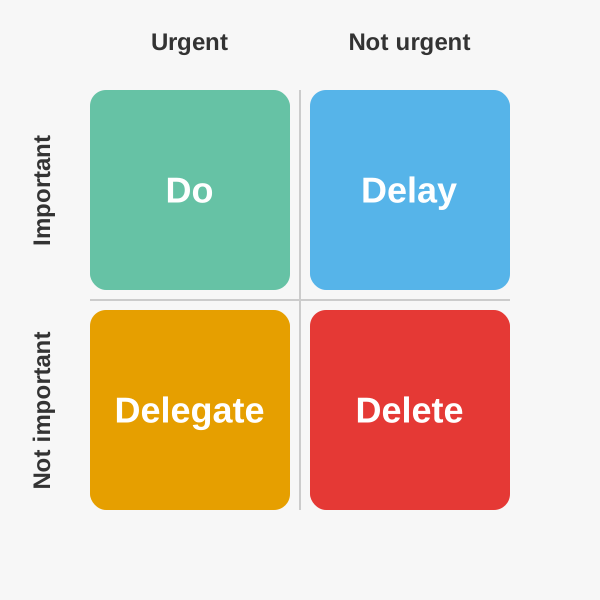
Quadrant Breakdown
Do
Tasks that are both urgent and important demand your immediate attention. These include deadline-driven projects, crises, and critical problems.
Action: Handle personally as soon as possible.
Delegate
Urgent yet unimportant tasks feel pressing but add little strategic value. Routine requests, minor logistics and basic data gathering belong here.
Action: Assign to someone else with precise instructions.
Delay
Important but not urgent tasks fuel long-term success — planning, skill building and relationship nurturing.
Action: Schedule specific time slots so they never become emergencies.
Delete
Tasks that are neither urgent nor important offer no benefit — most email threads, trivial admin and busywork.
Action: Remove or ignore to eliminate distractions.
Tips for Success
- Use a simple template: such as paper or digital in a simple text note. Consistency beats complexity. To-do list applications are useful for delaying work on tasks, but take time to manage that takes time away from getting work done.
- Protect focus blocks from interruptions. Block out time to focus in calendars and shut off communication when comfortable to carry out work without interruption.
- Match Delegate tasks to skill sets and provide clear expectations.
- Regularly purge your Delete list so it never swells.
- If using a work management system to manage a team, it helps to record why tasks were abandoned completely to avoid retreading the same ground on considerations already made.
Example Tasks
Below are examples of the types of tasks you might decide to push into the four quadrants.
“Do” — Important and Urgent Tasks
These are examples of tasks that require immediate attention and should come first.
- Handle a medical emergency — Immediate care required for health crises.
- Meet critical work deadlines — Projects or reports due today or tomorrow.
- Handle unplanned IT outages — Live server crashes or system failures.
- Pay overdue bills — Avoiding penalties or service interruptions.
- Fix a major home leak — Preventing escalating water damage.
“Delegate” — Not Important and Urgent Tasks
These are examples of tasks you could rely on others to do for you.
- Unscheduled calls — Interruptions that can be routed to a receptionist or voicemail.
- Catching up on emails — Noncritical messages that can be batch-processed or delegated.
- Lower-level meetings — Status updates better taken by an assistant or junior team member.
- Child’s permission note — Routine school paperwork someone else can sign.
- Chasing small sales — Low-value leads that interns or junior staff can handle.
“Delay” — Important and Not Urgent Tasks
These are examples of tasks that are important, but could be handled tomorrow, a week from now, a month from now, and so on.
- Financial planning — Budgeting and retirement prep without immediate deadline.
- Better test coverage that can wait — Design and build an end-to-end integration test suite for core customer workflows.
- Compliance for a much further deadline — Conduct a security audit and harden the authentication module ahead of next year’s compliance review.
- Large scale refactoring — Refactor the monolithic billing service into smaller microservices for maintainability.
- Documentation improvements — Draft and publish comprehensive API documentation for the upcoming v2 release.
“Delete” — Not Important and Not Urgent Tasks
- Pointless meetings — Attend recurring meetings with no clear agenda or outcomes.
- Non-functional changes — Reorganize project folders or tweak code style without functional gain.
- “Fun” but otherwise pointless tasks — Creating custom Slack emojis for internal developer channels.
- Unnecessary work — Reorganizing the GitHub repo structure based on personal preference.
- Features no one asked for — Building product features into a product for which there is no customer demand.